Apple Intelligence
Turn natural language into structured tasks with Apple Intelligence
Describe your task in a sentence, then tap Analyze. Keepio uses Apple Intelligence to help fill in the task details before you save it.
App Store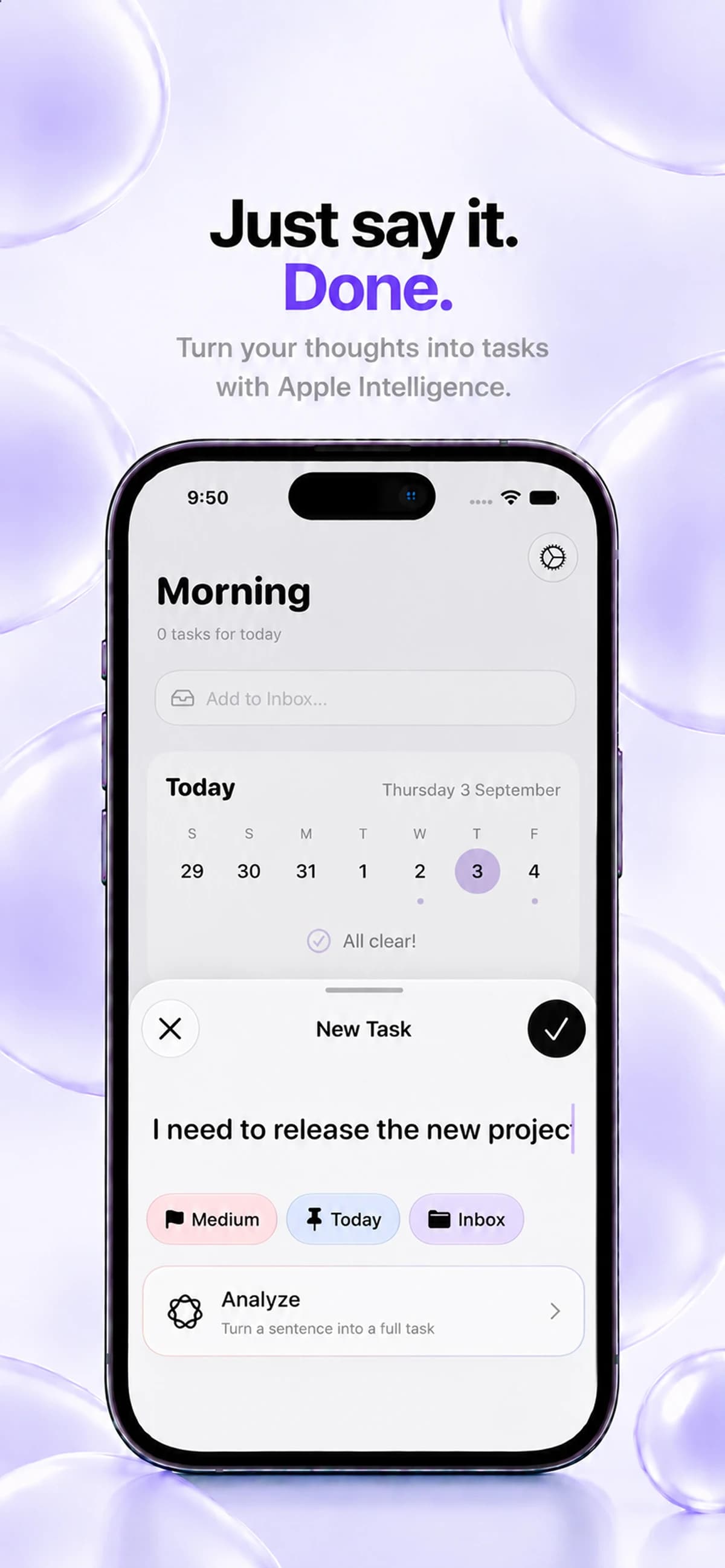
Write the task in your own words
Use natural-language input in the New Task flow to describe what you need to do. Keepio brings task creation into the same workspace as your projects and planning.
Use Analyze to structure it
The Analyze action uses Apple Intelligence to help turn your input into a structured task. This feature supports task creation; it is not a chat assistant.
Keep your plan intentional
Check the task details as part of your planning routine. Apple Intelligence availability depends on your device, language and system settings.
Before you start
- Which devices can run Keepio?
- Keepio is available on iPhone, iPad and Mac. On iPhone, it requires iOS 26 or later. Check the App Store for iPad and Mac requirements. Apple Intelligence features require a compatible device. An Android version is coming soon.
- What does Analyze need to work?
- On iPhone, use iOS 26 or later. Your device must support Apple Intelligence. Apple Intelligence must be enabled, your language must be supported, and the system model must be downloaded and ready. Keepio runs the Apple model directly on your device; once it is ready, these features can work offline.
- How does iCloud sync work?
- Sync happens automatically when you are signed in to iCloud and Keepio is allowed to use it. Your tasks, projects and notes are stored locally and synchronized through your private iCloud between devices using the same Apple Account. There is no iCloud sync switch inside Keepio. The Keepio team cannot access your private iCloud content.